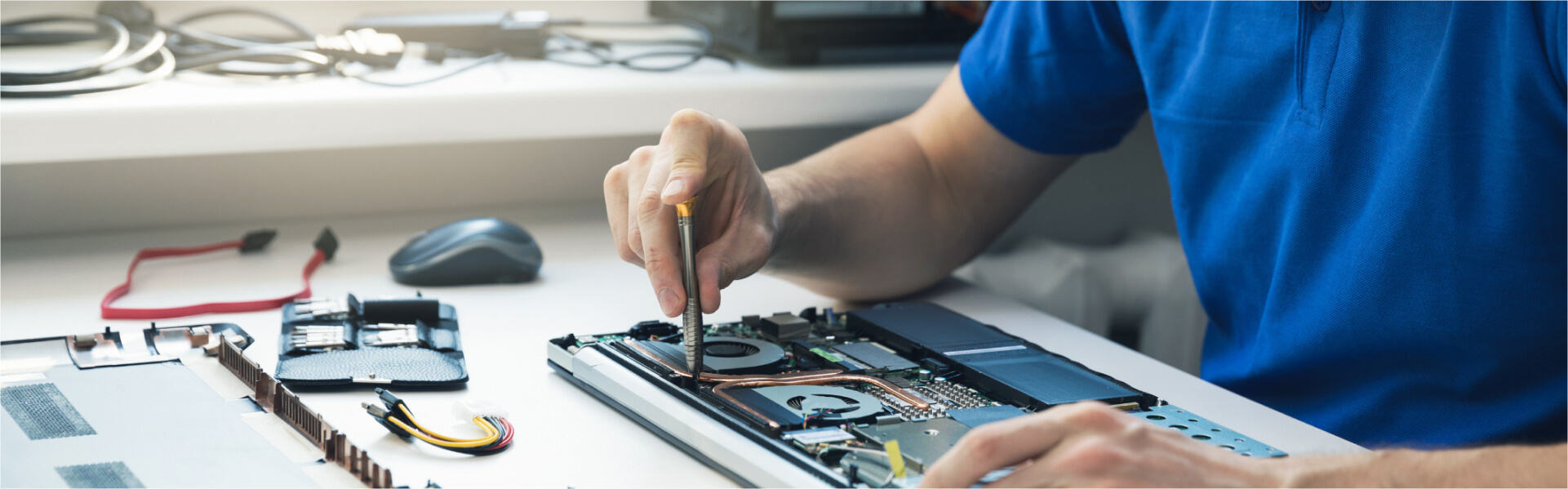
You press the power button and nothing happens. No chime, no light, no spinning fan - just a black screen and a sinking feeling about what a new laptop costs. Here's what a decade of MacBook repair in Boca Raton has taught us: the machine on the bench is usually not dead. Far more often it's unpowered, deeply discharged, blocked by a peripheral, or running perfectly well behind a display that stopped lighting up. This guide walks the same four checks we run at the counter before we quote anyone a dollar - then gives you honest numbers on what a real repair costs, and when we'd tell you to replace instead.
First Question: Is It Actually Off?
This sounds like a strange place to start, but it's the single most valuable thing in this article, and it's the check most people skip.
A MacBook whose display backlight has failed looks exactly like a MacBook that won't turn on. The screen stays black, so you assume there's no power. But the machine underneath is booting normally - it just has no light behind the panel to show you.
The flashlight test (30 seconds, costs nothing)
- Press the power button once and wait about 30 seconds.
- Shine a flashlight at the screen at a sharp angle, close to the surface. Use your phone's light.
- Look for a ghost image - a faint desktop, a login window, a dim Apple logo. If it's there, your Mac is on.
- Check the other signals too: does the keyboard backlight come on? Can you hear a fan or feel warmth? Does Caps Lock toggle a light? Any of those means the machine is powering up.
This matters enormously for what you're about to spend. A Mac that powers on but won't display is a screen or backlight problem - a defined, quotable repair. A Mac showing no signs of life at all is a power-path problem, which is a different investigation. Walking in already knowing which one you have saves everyone time.
💡 Why trust UltraTechX
4.9★ with 410+ five-star Google reviews. Apple & CompTIA A+ certified technicians. 90-day warranty on every repair. $29.99 diagnostic - waived when you go ahead with the repair.
The 4 Free Checks to Run Before You Pay Anyone
Run these in order. In our experience a meaningful share of "dead" MacBooks are solved somewhere in this list, and none of it costs you anything.
1. Rule out the charger - properly
Chargers and cables fail far more often than MacBooks do, and a half-failed cable is worse than a dead one because it looks fine.
- Try a different charger and a different cable. Borrow a known-good one if you can. Testing a suspect cable with a suspect brick proves nothing.
- Plug straight into a wall outlet - not a power strip you haven't tested, not a monitor, not a dock, not a hub.
- Check the MagSafe LED if your model has one. No light at all points at the cable, the adapter, or the port.
- Look at the USB-C cable you're using. Plenty of USB-C cables are charge-limited or data-only and won't deliver the wattage a MacBook needs. The one that came with your Mac is the safe test.
💡 The 20-minute rule almost nobody waits for
A battery discharged to zero and left flat for weeks will not respond to the power button immediately. Plug it in, leave it alone for a full 15-20 minutes, and only then press power. We have had machines arrive "completely dead" that simply needed to sit on a charger long enough to accept a trickle.
2. Force a restart
Press and hold the power button - or the Touch ID button - for a full 10 seconds, release, then press it once normally. Ten seconds feels much longer than you'd think; count it out. This clears a surprising number of hung startups where the Mac has power but is stuck before the display initialises.
3. Disconnect absolutely everything
Unplug external displays, docks, hubs, drives, SD cards, dongles, and any USB device. A failing dock or a shorted peripheral genuinely can prevent a MacBook from starting, and an external monitor set as the primary display can make a working Mac look blank. Strip it to bare machine plus its own charger, then retry.
4. Listen and feel
Put your ear to it. A fan spinning up, a startup chime, warmth near the hinge, or a keyboard backlight all confirm the power system is doing its job - which moves your problem downstream to the display, and usually downward in price.
💻 Ran all four and it's still black?
Bring it to 9146 Glades Rd and we'll tell you what's actually wrong before you commit to anything. Get your free quote or call (561) 923-9684.
Apple Silicon vs Intel: The Restart Advice That's Usually Wrong
Search this problem and you'll be told to "reset the SMC" within about two results. It's worth knowing that for most MacBooks sold in the last several years, that advice doesn't apply at all.
If your MacBook has an M1, M2, M3 or M4 chip
Apple silicon Macs have no System Management Controller to reset. Those functions were absorbed into the chip and are handled automatically at each boot. The forced restart in step 2 above - hold power for 10 seconds - is the equivalent action, and there is nothing further to key in. Any article walking you through a four-key SMC combination on an M-series MacBook is recycling Intel-era instructions.
If your MacBook is Intel-based
Intel Macs do have an SMC, and resetting it is a legitimate step for power and charging faults. The exact key combination differs depending on whether your model has a T2 security chip and whether the battery is removable, which is precisely why generic instructions so often fail - people run the wrong sequence for their machine and conclude the Mac is beyond help.
Getting into recovery
If the Mac powers up but won't boot into macOS, recovery mode is the next diagnostic step, and it too differs by architecture: Apple silicon Macs boot to startup options by holding the power button, while Intel Macs use a key combination at chime. Apple documents the current procedure for both in its guide on how to start up from macOS Recovery. If recovery loads, that's genuinely good news - your hardware is largely fine and you're looking at a software or drive problem rather than a board failure.
"Half the MacBooks people bring in convinced they need a new laptop just need a different charger, twenty minutes on power, or a screen. We'd rather tell you that in five minutes than sell you a repair you don't need."
— UltraTechX, 9146 Glades Rd, Boca Raton
Cheap Fix vs Real Repair - How to Tell
Once you've run the four checks, the symptoms sort fairly cleanly. Here's the same table we work from at the counter:
| What you're seeing | Points to a cheap fix | Points to a real repair |
|---|---|---|
| Signs of life | Fan, chime, warmth, keyboard backlight | Completely inert on a known-good charger |
| Flashlight test | Faint image visible - it's running | Nothing at all, no signals either |
| With a different charger | Charges or wakes - it was the charger | No change across two known-good chargers |
| History | Battery ran flat, sat unused for weeks | Follows a spill or a hard drop |
| Behaviour | Boots but is slow, or hangs at login | Powers for seconds then cuts out, or clicks |
Right-hand column doesn't mean catastrophe. It means the answer needs a diagnostic rather than a guess - and a diagnostic is exactly what stops you paying for the wrong part.
What MacBook Repair Costs in Boca Raton
Here's honest pricing for the repairs that most often sit behind a MacBook that won't turn on. You get a firm number before any work starts - never a range that quietly grows.
| Service | Price | Typical Time |
|---|---|---|
| Diagnostic | $29.99 (waived with repair) | Same visit |
| MacBook battery replacement | From $129 | 1 - 2 business days |
| MacBook screen / display replacement | From $199 | 2 - 3 business days |
| Keyboard replacement | From $149 | 2 - 4 business days |
| Liquid damage / board-level repair | $199 - $499 | 3 - 5 business days |
| Data recovery | From $149 | Quoted after diagnostic |
Note: These are estimates for UltraTechX Boca Raton. Final pricing depends on your exact model year and configuration, and is confirmed before we begin.
One thing we won't do is pretend a MacBook is a phone. Phone screens leave our counter in 30 to 60 minutes; MacBooks generally don't, because parts for a specific model year often have to come in. You'll get an honest timeline upfront rather than an optimistic one, and every repair carries our 90-day warranty on parts and workmanship. The full menu is on our MacBook repair page, and for Windows laptops and desktops see computer repair.
When It's the Logic Board or Liquid Damage
These are the two causes people fear most. They're less common than the internet suggests - but they're real, and both reward acting quickly.
Liquid damage
If anything was spilled on it, there are two things not to do, and both are things people do by instinct:
- Don't try to turn it on. Sending current through a wet board is what turns a recoverable machine into an unrecoverable one.
- Don't put it in rice. It does nothing for corrosion, which starts within hours and keeps going whether the machine is drying or not.
Instead: unplug it, close it, stand it upside down in a V so liquid drains away from the board, and bring it in the same day. We see a 70-80% success rate on MacBook liquid damage when the machine reaches us quickly, using ultrasonic cleaning and corrosion removal. The liquid-damage diagnostic is $49.99 rather than $29.99, because it needs a deeper board-level inspection. Our liquid damage diagnostic page covers the process, and the same first-hour principles apply to phones - see our water damage recovery guide.
Logic board failure
The genuine worst case, and the least common. Signs include powering on for a few seconds then cutting out, repeated boot loops, or total inertia across two known-good chargers with no signals at all. Board-level repair is component work under a microscope, not a parts swap, which is why it takes 3-5 business days and why an accurate diagnostic matters so much. It's also where a shop's honesty gets tested: we'd rather tell you a board isn't economically worth saving than take your money and hand back a machine that fails again in a month.
Is It Still Worth Repairing?
Fair question, and the answer is usually yes - but not always, and we'll say so when it isn't.
A new MacBook Air starts around $999, and a MacBook Pro climbs well past that. Set against repairs that mostly land between $129 and $499, the arithmetic favours repair in most cases. There's a second cost people forget too: replacing the machine means migrating everything, re-authorising software, and hoping your last backup was recent. Repair keeps your data where it is - which, as we wrote in our piece on whether your data is safe at a repair shop, is a question worth asking of any shop you hand a device to.
Replacement genuinely makes more sense when:
- Several expensive parts have failed together - screen and board, say - and the total approaches the price of a newer machine.
- Your model no longer receives macOS security updates, so you're buying time on a machine that's ageing out regardless.
- Liquid damage has spread widely across the board and the honest odds of a durable repair are poor.
In those cases we'll tell you, and we'll still help you get your data off. An honest "don't repair this" costs us one job and earns a customer - which is roughly how we've ended up with 410+ five-star reviews from neighbours you can look up.
❓ Frequently Asked Questions
Why won't my MacBook turn on?
The most common causes are not a dead MacBook. A failed charger or cable, a battery discharged so deeply it needs 15-20 minutes on power before it responds, a peripheral or dock blocking startup, or a failed display backlight on a Mac that is actually running are all far more frequent than logic board failure. Start by shining a flashlight at the screen at an angle: if you can see a faint desktop or login window, the Mac is on and your problem is the display, not the power system.
How do I force restart a MacBook that won't turn on?
Press and hold the power button (or Touch ID button) for a full 10 seconds, release, then press it once normally. On Apple silicon MacBooks with M1, M2, M3 or M4 chips there is no SMC to reset - this forced restart is the equivalent step. On older Intel MacBooks an SMC reset is a separate sequence that varies by model. Most "reset your SMC" advice online was written for Intel Macs and doesn't apply to Apple silicon at all.
How much does MacBook repair cost in Boca Raton?
At UltraTechX in Boca Raton, MacBook battery replacement starts at $129, screen replacement starts at $199, and keyboard replacement starts at $149. Liquid damage and board-level repairs run $199-$499 depending on the extent of the damage. Our diagnostic is $29.99 and is waived when you go ahead with the repair, so you get a firm number before any work begins.
How long does MacBook repair take?
MacBooks aren't a 30-minute job the way phones are, and we'd rather tell you that upfront. Battery replacement typically takes 1-2 business days, screen replacement 2-3 business days, keyboard replacement 2-4 business days, and logic board repair 3-5 business days. Software issues and simple fixes are often same-day. Parts availability is the usual variable, and we give you a firm timeline after the diagnostic rather than an optimistic guess.
Is my MacBook worth repairing or should I replace it?
A new MacBook Air starts around $999 and a MacBook Pro considerably higher, while most common MacBook repairs at UltraTechX fall between $129 and $499. That maths usually favours repair, and repair also keeps your data on the machine instead of forcing a migration. Replacement makes more sense when several expensive components have failed at once, when the machine no longer receives macOS updates, or when liquid damage has spread across the board. We'll tell you plainly when we think replacement is the better call.
My MacBook got wet and won't turn on. What should I do?
Don't try to turn it on, and don't put it in rice. Powering up a wet board is what turns a recoverable machine into an unrecoverable one, and rice does nothing about corrosion that's already starting. Unplug it, close it, keep it upside down in a V shape so liquid drains away from the board, and bring it in the same day. Liquid damage worsens by the hour. We see a 70-80% success rate on MacBook liquid damage when the machine reaches us quickly, using ultrasonic cleaning and corrosion removal. The liquid-damage diagnostic is $49.99 because it requires a deeper board-level inspection.